
Do more when you need it.
SALTYDATA includes everything for everyday vehicle trading. Add-ons extend the licence with special tasks – bookable one by one, monthly or yearly, with no automatic renewal. The complete package includes TabApp, Vehicle import & export and Invoices.

TabApp
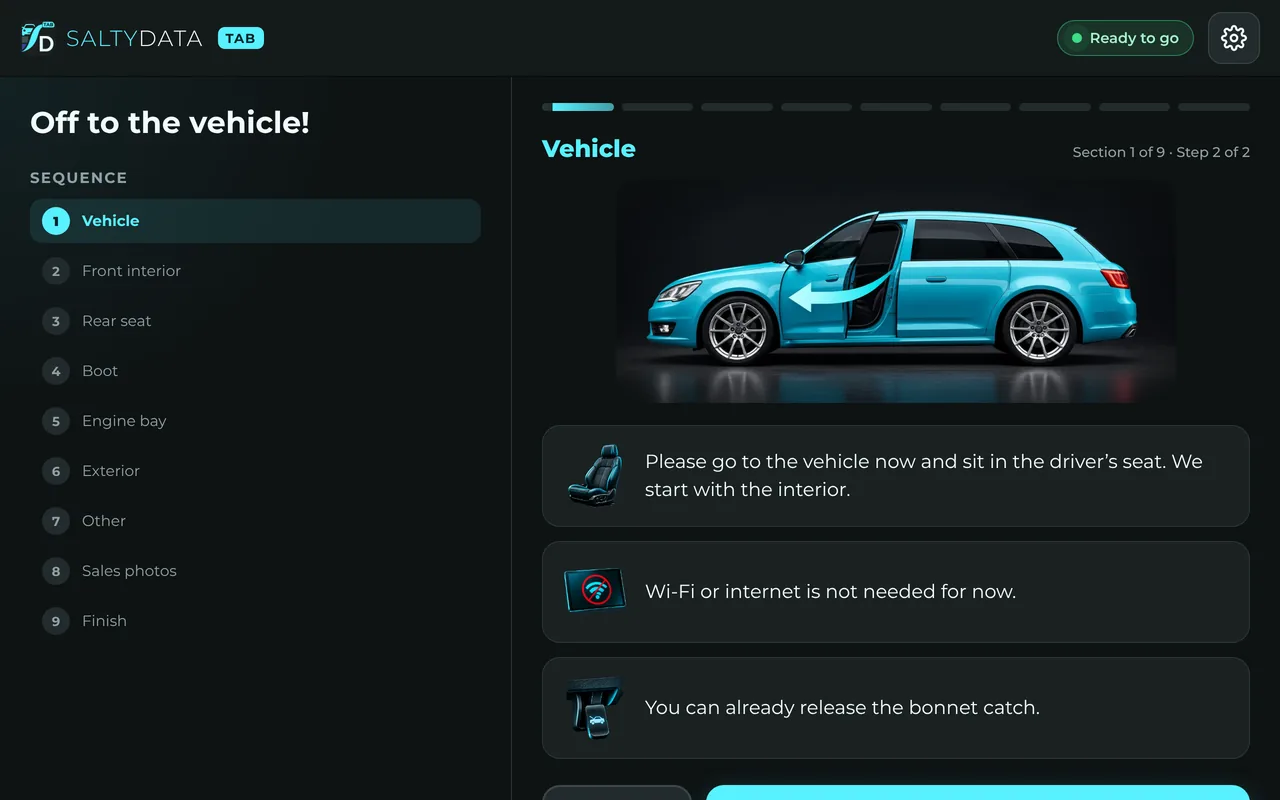
Guided capture right at the vehicle – no Wi-Fi needed.
With a tablet of your choice you record all important data right at the vehicle: equipment, damage, repairs and every other vehicle detail. The TabApp guides you step by step through the intake – so simply that anyone can record a vehicle reliably, even the apprentice.
This also works right in the seller's yard, wherever the vehicle is, and without interrupting the conversation. No internet is needed at the vehicle: as soon as the tablet is online again, via any Wi-Fi or mobile data, all data is in SALTYDATA automatically. So your head office can already order parts, plan repairs and offer the vehicle – before it even stands on your own sales lot.
What the TabApp does
- Guided walkaround – nothing gets missed
- Scan the registration instead of typing
- Equipment, mileage, tyres and inspection at a tap
- Damage with photo – straight into SALTYDATA as a repair
- Sales photos with the camera
- No Wi-Fi needed at the car
How it works
- Pairscan the QR code
- Recordonce around the car
- Donevehicle is in SALTYDATA
For adding new passenger cars only. Tablet not included – any iPad or Android tablet with camera and Wi-Fi will do.

Vehicle import & exportNew
Country rules, cost calculator and all documents for import and export.
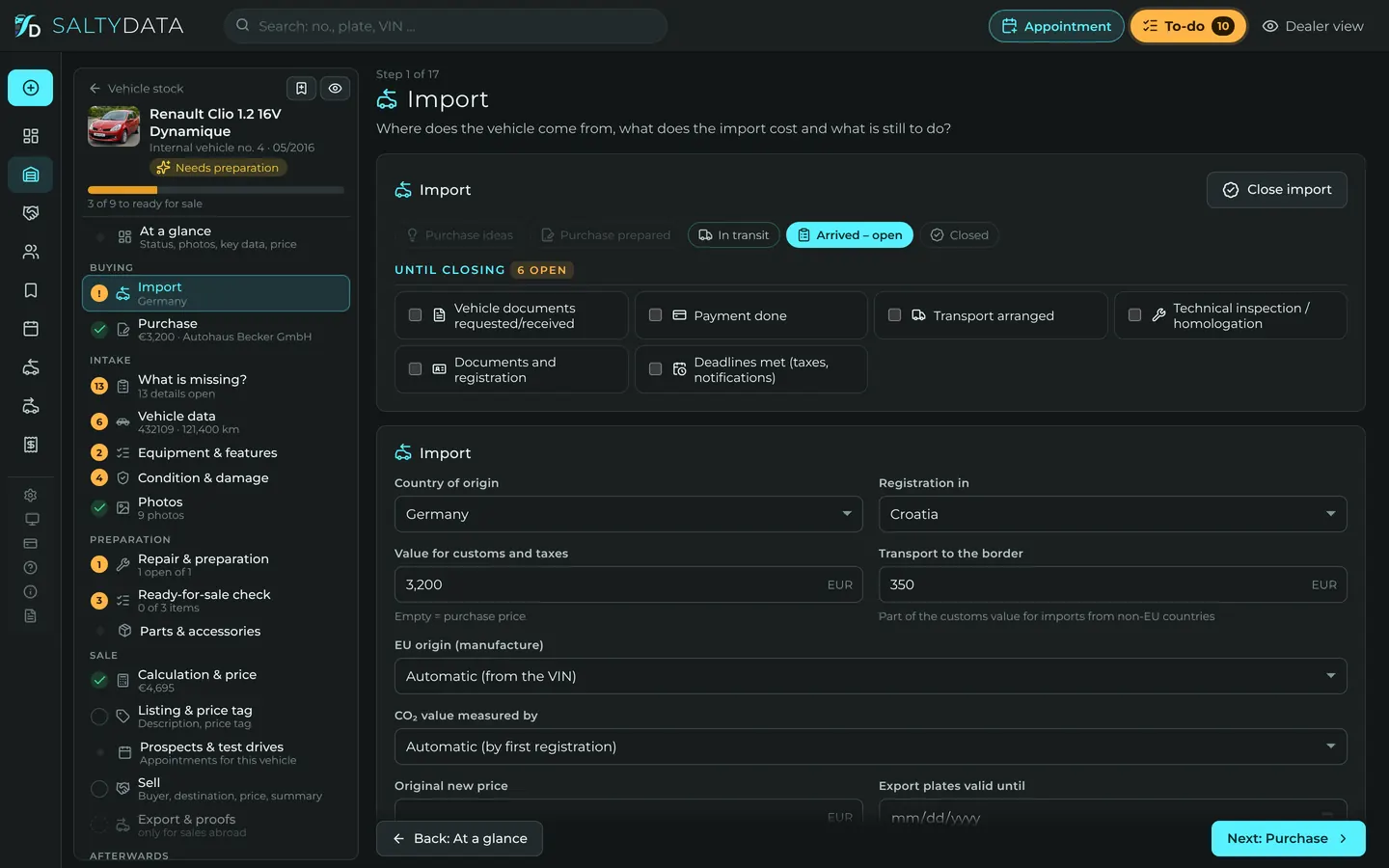
Buy vehicles abroad or sell them abroad – following the rules of each country. SALTYDATA checks whether a vehicle may be imported, calculates the costs, chooses the right tax case when selling, fills in all forms and keeps track of documents, proofs and deadlines.
How the add-on helps you
Customs duty, import VAT and special taxes of the destination country at a glance – before you commit. The costs go into your calculation with one click.
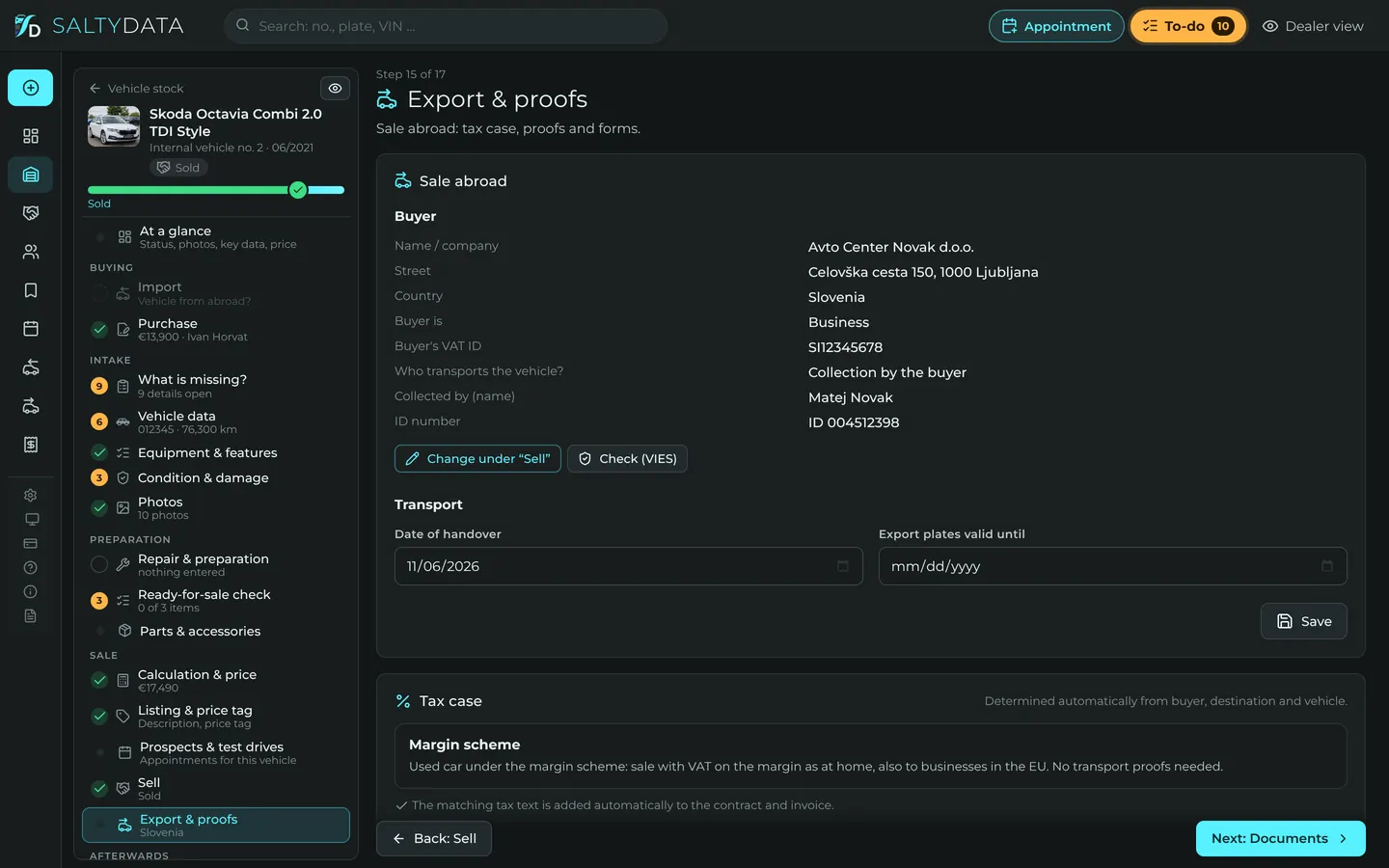
SALTYDATA recognises the tax case and adds the matching mandatory text to the contract and invoice – in the buyer’s language.
Entry certificate, powers of attorney, CMR consignment note and more – from the vehicle and customer data, bilingual, as PDF to print or send.
Documents per country to tick off, missing proofs visible with the vehicle, deadlines as to-dos – so the tax exemption holds up in an audit.
Buying abroad – step by step
- Purchase ideasNote vehicles and calculate the costs in advance
- Purchase preparedPrint the purchase folder: contract, handover report, powers of attorney, VIES proof, checklist
- In transitThe vehicle is bought and on its way
- Arrived – openTick off papers, payment, inspection and registration
- ClosedThe vehicle is in stock as “New arrival” and follows the normal path
Import
- Import check: emission standard, age limit and origin of the vehicle (EU or not)
- Cost calculator: customs duty, import VAT, special taxes such as NoVA (AT), DMV (SI), PPMV (HR) and fees
- Add the import costs to the sales calculation with one click
- Documents per country to tick off, deadlines (e.g. payment of the special tax) as to-dos
- Import cost statement as PDF
Export and sales abroad
- Tax case assistant: domestic, tax-exempt supply to an EU business, new vehicle, margin scheme, private customer from the EU or export
- Check of the buyer’s VAT ID directly with the EU (VIES) – with consultation number as proof
- Proofs with the vehicle: what is there, what is missing
- Mandatory texts and clauses in contract and invoice
- All forms for buyer, forwarder and customs as PDF
Forms and documents
Filled in from the vehicle, buyer and company data. Bilingual: in your language and in English – so every buyer, forwarder and customs office understands them.
The buyer confirms that the vehicle arrived in the other EU country – proof for the tax-exempt EU supply. Also as a collective certificate per quarter.
If the buyer collects the vehicle: declaration that they will take it to the other EU country.
So that another person may register or deregister the vehicle.
For the customs agent or forwarder making the export or import declaration.
So that a driver or forwarder may collect the vehicle.
All details on vehicle, buyer and seller on one page – for customs agent, forwarder or registration office.
Pre-filled with sender, consignee and vehicle – proof of transport when a forwarder carries the vehicle.
Which documents are needed for this vehicle and this country – to tick off and hand over.
Customs duty, import VAT, special tax and fees at a glance – for you or your customer.
Matching clauses for EU supply and export and the note on the tax exemption – automatically in the contract.
Documents and proofs at a glance
SALTYDATA shows per country which documents you need and which proofs you must keep. Tick off what you have with the vehicle.
When buying abroad
- Invoice and purchase contract
- Registration certificate
- EC certificate of conformity (COC)
- EUR.1 or origin declaration (for lower duty)
- Export plates and insurance for the transfer
- Seller’s export declaration
- Technical inspection or homologation in the destination country
- Proof of customs value, power of attorney
When selling abroad
- VAT ID check (VIES) with consultation number
- Entry certificate or collection confirmation
- CMR consignment note and forwarder’s invoice
- Export declaration with MRN
- Customs exit confirmation (proof of export)
- Export plates, deregistration
- Invoice with the matching mandatory text
The tax case assistant recognises
- Domestic sale – regular invoice with VAT
- Business in another EU country – tax-exempt intra-community supply – with VAT ID check and proof of arrival
- New vehicle to another EU country – always tax-exempt, also for private buyers – the buyer pays VAT in their own country
- Margin scheme – used vehicle bought from a private seller: no VAT shown, with mandatory text
- Private customer from the EU – used vehicle with the VAT of the seller’s country
- Export outside the EU – tax-exempt – with export declaration and exit confirmation
Import rules per country (excerpt)
| Country | Minimum emission standard | Maximum age | Special tax | VAT |
|---|---|---|---|---|
| Albania | Euro 4 | none | none | 20 % |
| Austria | none | none | NoVA (registration tax) | 20 % |
| Bosnia and Herzegovina | Euro 5 | none | none | 17 % |
| Bulgaria | none | none | none | 20 % |
| Croatia | none | none | PPMV (by price, CO₂ and age) | 25 % |
| Germany | none | none | none | 19 % |
| Italy | none | none | IPT (provincial tax by kW) | 22 % |
| Kosovo | Euro 4 | 10 years | Excise duty by engine size and age | 18 % |
| Montenegro | Euro 5 | 15 years | Tax on used vehicles | 21 % |
| North Macedonia | Euro 4 | none | Excise duty by CO₂ and age | 18 % |
| Serbia | Euro 3 | none | none | 20 % |
| Slovenia | none | none | DMV (by CO₂, emission standard and age) | 22 % |
| Switzerland | none | none | Automobile tax (4 % of the vehicle value) | 8.1 % |
Country rules for GermanyAustriaSwitzerlandSloveniaCroatiaItalyBulgariaSerbiaBosnia and HerzegovinaMontenegroNorth MacedoniaAlbaniaKosovo
The country rules are updated continuously and reach the program automatically; the version is shown there. All amounts are estimates – the assessments of customs and authorities are binding.

InvoicesNew
E-invoice according to your country's rules – with handover to accounting.
A clean document for every sale, to hand over and to file – in line with the rules of your country. Where the invoice may be issued from SALTYDATA, it is created there. Where the law requires a separate till or e-invoicing program, SALTYDATA prints a sales receipt and prepares the data for your program.
How the add-on helps you
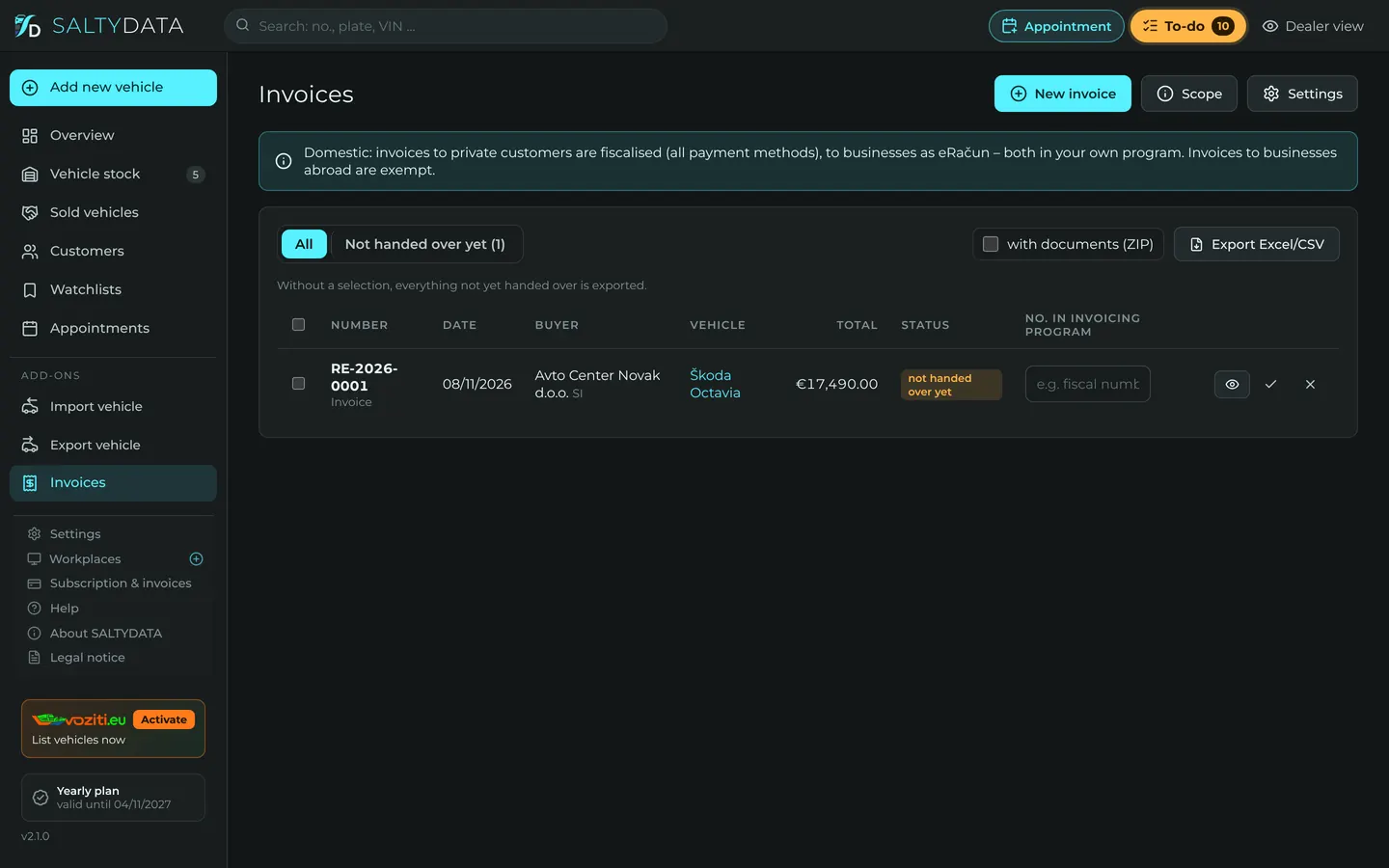
Buyer, vehicle and price are already there. SALTYDATA chooses the tax case and mandatory text and assigns the next number.
Before booking you see which invoices SALTYDATA may create in your country – and for which you need your till or e-invoicing program.
All sales as an export file for your invoicing program and for your tax adviser – individually or collected, whenever it suits you.
Invoice or sales receipt – a document for the buyer and your records for every sale.
Functions
- Invoice or sales receipt straight from the vehicle – buyer, vehicle data and price are taken over
- Tax case automatically: regular VAT, margin scheme, tax-exempt (EU supply, export) or small business
- Mandatory texts in the language of the invoice
- Own number ranges for invoices, sales receipts and cancellations
- Cancel with one click – the cancellation invoice is created automatically
- Add the number from your till or invoicing program
- Overview of all invoices with filter and search
Documents and files
- Invoice as PDF
- Sales receipt as PDF
- Cancellation invoice as PDF
- E-invoice as XML (EN 16931, ZUGFeRD/Factur-X CII format) for businesses in Germany
- Swiss QR-bill: payment part with receipt and QR code (QR-IBAN with QR reference or IBAN with Creditor Reference) for dealers in Switzerland
- Export for your tax adviser: DATEV (Germany), otherwise Excel/CSV – per month or quarter
- Export file for your invoicing or till program
- Everything as ZIP with all PDFs
Scope in
Included
- Invoice from SALTYDATA: to private customers
- Invoice from SALTYDATA: to businesses abroad
- Invoice from SALTYDATA: to businesses in Germany as e-invoice (ZUGFeRD)
- Print a sales receipt – for every sale, to hand over and for your records
- Export file for your invoicing or till program (individually or collected)
- Export for your tax adviser (month or quarter)
- Mandatory texts per tax case in the local language
- Filed with the vehicle
Not included
- Direct transmission to the tax authority, fiscal till or e-invoicing systemHow SALTYDATA helps: all sales as a file to hand over (Excel/CSV) to your invoicing program and as an export for your tax adviser – per month or quarter.
Included
- Invoice from SALTYDATA: with payment by bank transfer
- Invoice from SALTYDATA: to businesses abroad
- Print a sales receipt – for every sale, to hand over and for your records
- Export file for your invoicing or till program (individually or collected)
- Export for your tax adviser (month or quarter)
- Mandatory texts per tax case in the local language
- Filed with the vehicle
Not included
- Invoice for cash or card payment (cash register) – only via your invoicing or till programHow SALTYDATA helps: a sales receipt to hand over and an export file with all details (buyer, vehicle, price, tax case) to import into your program – individually or collected, whenever it suits you.
- Direct transmission to the tax authority, fiscal till or e-invoicing systemHow SALTYDATA helps: all sales as a file to hand over (Excel/CSV) to your invoicing program and as an export for your tax adviser – per month or quarter.
Included
- Invoice from SALTYDATA: with payment by bank transfer (to businesses in Slovenia until 31 Dec 2027)
- Invoice from SALTYDATA: to businesses abroad
- Print a sales receipt – for every sale, to hand over and for your records
- Export file for your invoicing or till program (individually or collected)
- Export for your tax adviser (month or quarter)
- Mandatory texts per tax case in the local language
- Filed with the vehicle
Not included
- Invoice for cash or card payment (fiscal register) – only via your invoicing or till programHow SALTYDATA helps: a sales receipt to hand over and an export file with all details (buyer, vehicle, price, tax case) to import into your program – individually or collected, whenever it suits you.
- Invoice from 2028 to businesses in Slovenia (e-invoice) – only via your invoicing or till programHow SALTYDATA helps: a sales receipt to hand over and an export file with all details (buyer, vehicle, price, tax case) to import into your program – individually or collected, whenever it suits you.
- Direct transmission to the tax authority, fiscal till or e-invoicing systemHow SALTYDATA helps: all sales as a file to hand over (Excel/CSV) to your invoicing program and as an export for your tax adviser – per month or quarter.
Included
- Invoice from SALTYDATA: to businesses abroad
- Print a sales receipt – for every sale, to hand over and for your records
- Export file for your invoicing or till program (individually or collected)
- Export for your tax adviser (month or quarter)
- Mandatory texts per tax case in the local language
- Filed with the vehicle
Not included
- Invoice to customers in Croatia (eRačun, fiscalisation) – only via your invoicing or till programHow SALTYDATA helps: a sales receipt to hand over and an export file with all details (buyer, vehicle, price, tax case) to import into your program – individually or collected, whenever it suits you.
- Direct transmission to the tax authority, fiscal till or e-invoicing systemHow SALTYDATA helps: all sales as a file to hand over (Excel/CSV) to your invoicing program and as an export for your tax adviser – per month or quarter.
Included
- Invoice from SALTYDATA: to businesses (Federation)
- Invoice from SALTYDATA: to businesses abroad (Federation)
- Print a sales receipt – for every sale, to hand over and for your records
- Export file for your invoicing or till program (individually or collected)
- Export for your tax adviser (month or quarter)
- Mandatory texts per tax case in the local language
- Filed with the vehicle
Not included
- Invoice to private customers (fiscal device) – only via your invoicing or till programHow SALTYDATA helps: a sales receipt to hand over and an export file with all details (buyer, vehicle, price, tax case) to import into your program – individually or collected, whenever it suits you.
- Invoice in Republika Srpska: for all sales, cash and non-cash (fiscal device) – only via your invoicing or till programHow SALTYDATA helps: a sales receipt to hand over and an export file with all details (buyer, vehicle, price, tax case) to import into your program – individually or collected, whenever it suits you.
- Direct transmission to the tax authority, fiscal till or e-invoicing systemHow SALTYDATA helps: all sales as a file to hand over (Excel/CSV) to your invoicing program and as an export for your tax adviser – per month or quarter.
Included
- Invoice from SALTYDATA: to businesses abroad
- Print a sales receipt – for every sale, to hand over and for your records
- Export file for your invoicing or till program (individually or collected)
- Export for your tax adviser (month or quarter)
- Mandatory texts per tax case in the local language
- Filed with the vehicle
Not included
- Invoice to customers in Serbia (SEF, fiscal device) – only via your invoicing or till programHow SALTYDATA helps: a sales receipt to hand over and an export file with all details (buyer, vehicle, price, tax case) to import into your program – individually or collected, whenever it suits you.
- Direct transmission to the tax authority, fiscal till or e-invoicing systemHow SALTYDATA helps: all sales as a file to hand over (Excel/CSV) to your invoicing program and as an export for your tax adviser – per month or quarter.
Included
- Print a sales receipt – for every sale, to hand over and for your records
- Export file for your invoicing or till program (individually or collected)
- Export for your tax adviser (month or quarter)
- Mandatory texts per tax case in the local language
- Filed with the vehicle
Not included
- Invoice to all customers (fiscalisation) – only via your invoicing or till programHow SALTYDATA helps: a sales receipt to hand over and an export file with all details (buyer, vehicle, price, tax case) to import into your program – individually or collected, whenever it suits you.
- Direct transmission to the tax authority, fiscal till or e-invoicing systemHow SALTYDATA helps: all sales as a file to hand over (Excel/CSV) to your invoicing program and as an export for your tax adviser – per month or quarter.
Included
- Invoice from SALTYDATA: to businesses with payment by bank transfer
- Invoice from SALTYDATA: to businesses abroad
- Print a sales receipt – for every sale, to hand over and for your records
- Export file for your invoicing or till program (individually or collected)
- Export for your tax adviser (month or quarter)
- Mandatory texts per tax case in the local language
- Filed with the vehicle
Not included
- Invoice for cash payment by private customers (fiscal register) – only via your invoicing or till programHow SALTYDATA helps: a sales receipt to hand over and an export file with all details (buyer, vehicle, price, tax case) to import into your program – individually or collected, whenever it suits you.
- Direct transmission to the tax authority, fiscal till or e-invoicing systemHow SALTYDATA helps: all sales as a file to hand over (Excel/CSV) to your invoicing program and as an export for your tax adviser – per month or quarter.
Included
- Print a sales receipt – for every sale, to hand over and for your records
- Export file for your invoicing or till program (individually or collected)
- Export for your tax adviser (month or quarter)
- Mandatory texts per tax case in the local language
- Filed with the vehicle
Not included
- Invoice to all customers, including export (fiscalisation) – only via your invoicing or till programHow SALTYDATA helps: a sales receipt to hand over and an export file with all details (buyer, vehicle, price, tax case) to import into your program – individually or collected, whenever it suits you.
- Direct transmission to the tax authority, fiscal till or e-invoicing systemHow SALTYDATA helps: all sales as a file to hand over (Excel/CSV) to your invoicing program and as an export for your tax adviser – per month or quarter.
Included
- Invoice from SALTYDATA: to businesses with payment by bank transfer
- Invoice from SALTYDATA: to businesses abroad
- Print a sales receipt – for every sale, to hand over and for your records
- Export file for your invoicing or till program (individually or collected)
- Export for your tax adviser (month or quarter)
- Mandatory texts per tax case in the local language
- Filed with the vehicle
Not included
- Invoice to private customers (fiscal device) – only via your invoicing or till programHow SALTYDATA helps: a sales receipt to hand over and an export file with all details (buyer, vehicle, price, tax case) to import into your program – individually or collected, whenever it suits you.
- Direct transmission to the tax authority, fiscal till or e-invoicing systemHow SALTYDATA helps: all sales as a file to hand over (Excel/CSV) to your invoicing program and as an export for your tax adviser – per month or quarter.
Included
- Invoice from SALTYDATA: with payment by bank transfer
- Invoice from SALTYDATA: to businesses abroad
- Print a sales receipt – for every sale, to hand over and for your records
- Export file for your invoicing or till program (individually or collected)
- Export for your tax adviser (month or quarter)
- Mandatory texts per tax case in the local language
- Filed with the vehicle
Not included
- Invoice for cash or card payment (fiscal receipt) – only via your invoicing or till programHow SALTYDATA helps: a sales receipt to hand over and an export file with all details (buyer, vehicle, price, tax case) to import into your program – individually or collected, whenever it suits you.
- Direct transmission to the tax authority, fiscal till or e-invoicing systemHow SALTYDATA helps: all sales as a file to hand over (Excel/CSV) to your invoicing program and as an export for your tax adviser – per month or quarter.
Included
- Print a sales receipt – for every sale, to hand over and for your records
- Export file for your invoicing or till program (individually or collected)
- Export for your tax adviser (month or quarter)
- Mandatory texts per tax case in the local language
- Filed with the vehicle
Not included
- Invoice to all customers, also abroad (transmission via SDI) – only via your invoicing or till programHow SALTYDATA helps: a sales receipt to hand over and an export file with all details (buyer, vehicle, price, tax case) to import into your program – individually or collected, whenever it suits you.
- Direct transmission to the tax authority, fiscal till or e-invoicing systemHow SALTYDATA helps: all sales as a file to hand over (Excel/CSV) to your invoicing program and as an export for your tax adviser – per month or quarter.
Included
- Invoice from SALTYDATA: to private customers
- Invoice from SALTYDATA: to businesses in Switzerland
- Invoice from SALTYDATA: to customers abroad (export)
- Print a sales receipt – for every sale, to hand over and for your records
- Export file for your invoicing or till program (individually or collected)
- Export for your tax adviser (month or quarter)
- Mandatory texts per tax case in the local language
- Filed with the vehicle
Not included
- Direct transmission to the tax authority, fiscal till or e-invoicing systemHow SALTYDATA helps: all sales as a file to hand over (Excel/CSV) to your invoicing program and as an export for your tax adviser – per month or quarter.
As of 2026-11-11 · no guarantee. The dealer is responsible for complete records.

WorkstationsNew
Several PCs, one set of data – working at the same time.
Several computers in the office work with the same data – at the same time. One computer is the main computer, the others connect to it. No server, no cloud, no technician needed.
How to set it up
- Choose the main computerSwitch it on in the settings under “Several workplaces” and confirm the Windows permission once.
- Connect another computerInstall SALTYDATA and choose “Connect to main computer”. The main computer is found in the office network – otherwise use the connection code.
- Allow it on the main computerOne click on the main computer – done. The computer is now connected.
Good to know
- All data stays on the main computer in your office – nothing goes to a cloud
- The connection in the office network is encrypted
- The main computer must be switched on – SALTYDATA does not need to be open there
- Notice when a vehicle is being edited on another computer
- The history shows on which computer something was changed
- Open and print documents on your own computer
- Computers are counted, not persons
- Windows 10 or 11, all computers in the same office network
What it costs
More than 5 computers? Write to us – we will make you an offer. hello@saltysoulcreatives.com
What suits me?
Five short questions – SALTYDATA shows you the cheapest matching choice.
All add-ons in the complete package
Licence, TabApp, Import & Export and Invoices – and future add-ons included automatically. For up to 3 or 5 computers as a package tier.
Booking is done directly in SALTYDATA under “Subscription & invoices”. Time already paid for individual add-ons is credited when switching to the package.